Available for Windows, macOS and Linux
olw-player
Take a MIDI file and turn it into lifelike sound. Improve the instruments’ performance and shape the sound with a real-time audio chain, without building a DAW project.
Start with your MIDI file. Shape a backing track that feels more natural, balanced and enjoyable to play with. olw-player works on both the performance written in the file and the sound you hear: two different stages in one program. Open the song, choose a SoundFont, listen and adjust the options. Your original file stays intact.
Take a MIDI file and turn it into lifelike sound
A different instrument sound is a start. How the notes are played matters too: legato, expression, dynamics, overlapping parts and levels can make even a good SoundFont sound artificial. Here you can work on both layers without setting up a DAW project.
1. Enhance the MIDI performance
Note cleanup, instrument-family corrections, selectable groove and humanisation. Wind phrasing adds more natural attacks, legato and vibrato to solo lines, respecting existing expression where the corresponding checks apply.
2. Balance the backing track
Balance channels and reduce duplicate parts. Timbre reinforcement layers complementary instruments underneath guitars and winds; Protect vocals can lower parts that mask the guide melody where a suitable guide is recognised.
3. Shape the sound as you listen
The audio chain processes the synthesised MIDI/KAR stereo mix: warmth, body, ambience, dynamics and width. Change the options and press Apply to hear the result, without first exporting an audio file.
An audio chain, beyond changing instrument sounds
After MIDI corrections, the synthesiser produces the sound. You can then apply the stages you need for that song:
| Processing | What you can achieve |
|---|---|
| Valve-style warmth and multiband bass | More harmonics and body; bass harmonics help its presence on small speakers. |
| Bass, low mids, treble and presence | A tonal balance suited to your SoundFont and listening setup. |
| Convolution reverb | Ambience based on impulse responses, as an alternative to the built-in reverb. |
| Gentle compression and stereo widening | More cohesion and control over width when needed. |
| Final limiter | Peak control after audio processing. |
Adjust these controls to taste rather than switching every effect on. Some incompatible combinations are handled automatically. Results depend on the source MIDI, SoundFont and settings; you can save song preferences and compare processing by switching it on and off.
This chain processes synthesised MIDI/KAR sound, rather than MP3, CD+G or video. MIDI export saves musical edits; audio effects remain part of synthesiser playback.
Explore corrections and effects in the guide
Keep the song’s character or choose a new interpretation
Keep the MIDI’s original setup and work on its corrections, or choose from 14 styles, from Rock and Jazz to Disco / Dance, Latin / Bossa, House and R&B. For supported style families, with rearrangement enabled, accompaniment parts are rebuilt from recognised chords. Protected parts are excluded from that processing.
Then take it live
olw-player also plays MIDI, KAR, CD+G, MP3 and video: change key during playback, display karaoke lyrics on Monitor and Mirror, and mute the guide melody to sing over the backing track. The difference starts with MIDI enhancement before the lyrics even appear.
What it looks like
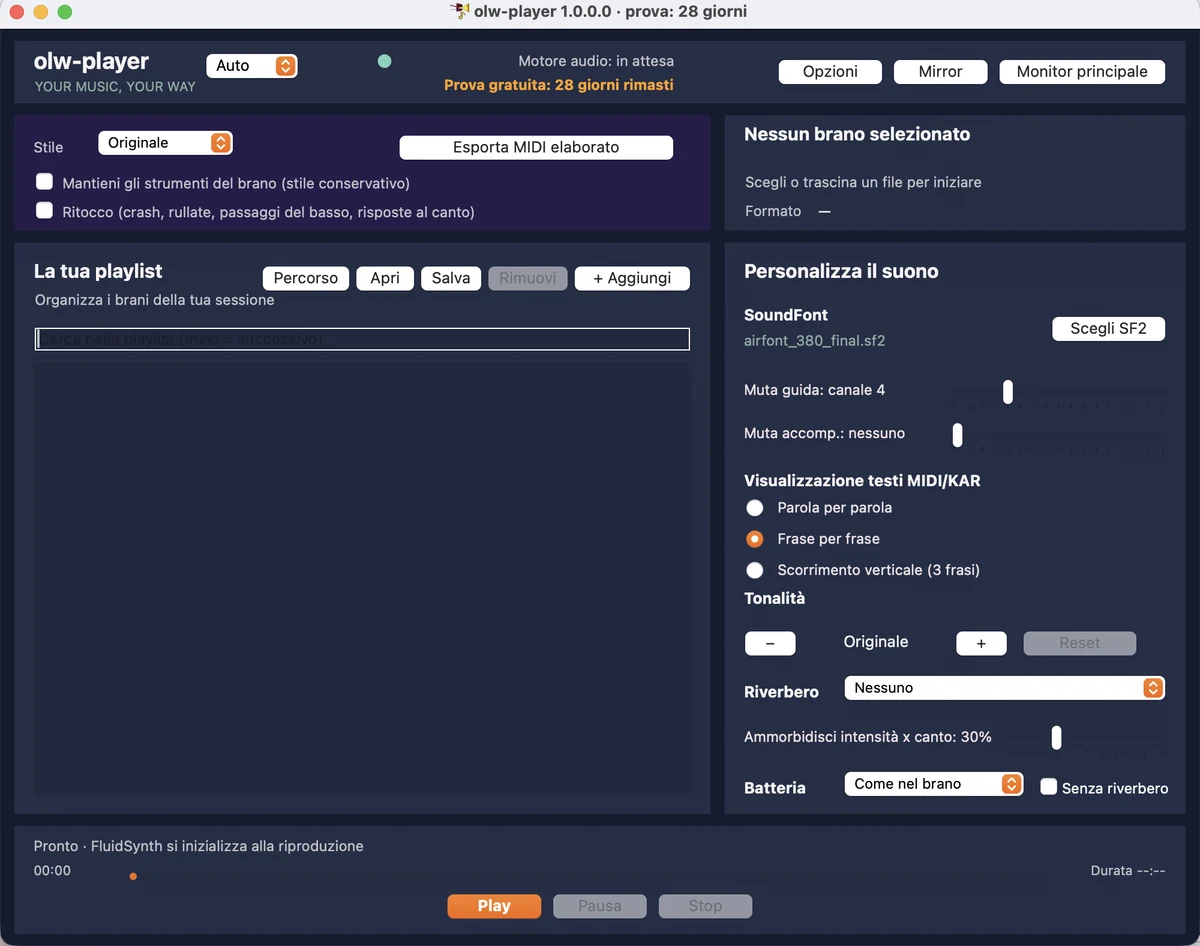
The main window: playlist, SoundFont, channel muting, lyric mode and key, all within reach.
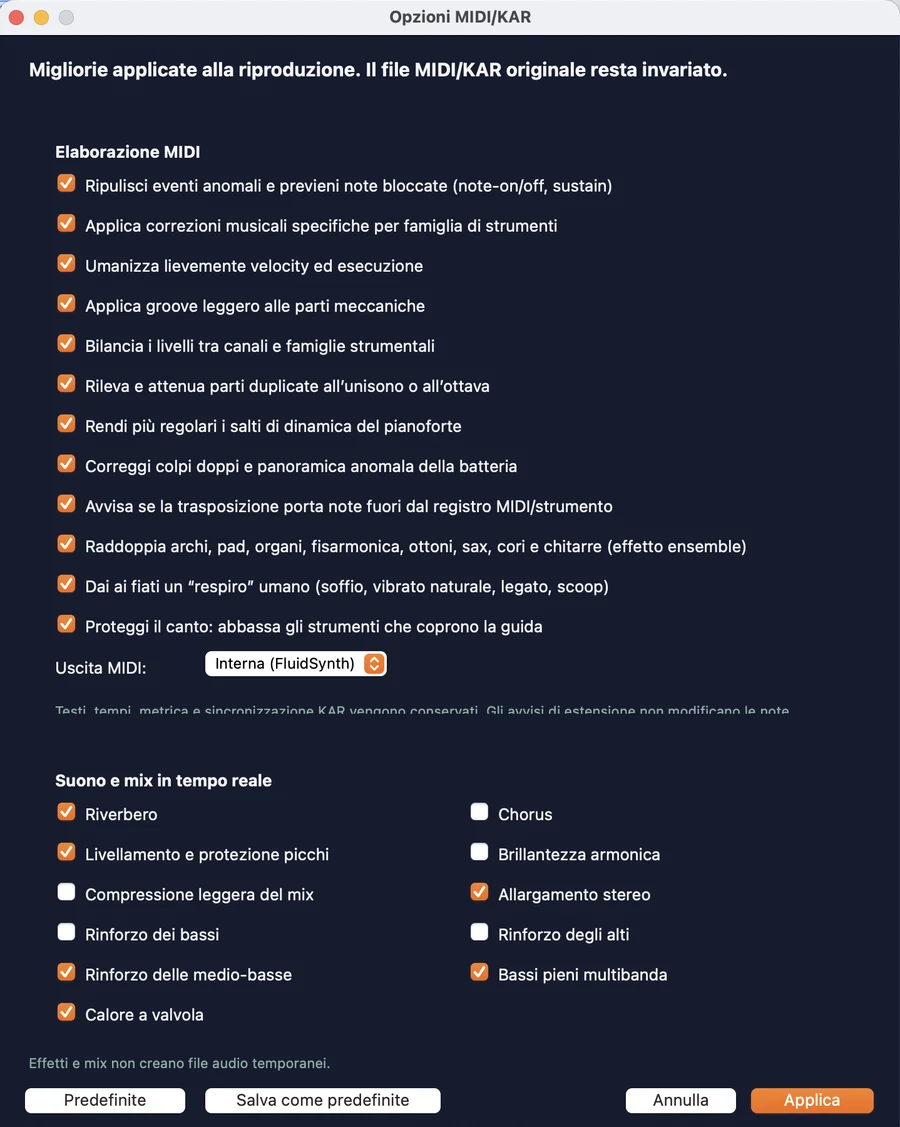
MIDI/KAR options: file corrections and real-time effects can be switched on and off with a checkbox.
What it can do
- Formats: MIDI (.mid), KAR, CD+G (.cdg with its MP3), MP3 and MP4/MOV/AVI video. An MP3 alongside a .cdg file with the same name is recognised as a single song.
- Three karaoke lyric modes: word by word (with the current word highlighted), phrase by phrase and vertical scrolling: three phrases at a time, with the line to sing in yellow in the centre and the current word in orange, moving up at each change.
- 14 MIDI styles: Rock, Funk, Pop, Jazz, Ballad, Electronic, Blues, Disco / Dance, Latin / Bossa, Country / Folk, Reggae / Ska, House, Hip Hop and R&B. Corrections and sounds follow the selected style; chord-based rearrangement is available for supported families when enabled.
- All features included: style changes and processed MIDI export are included in the subscription and the 30-day free trial (details).
- Options with explanations: each option has help (right-click → Help) explaining its purpose and conflicts; selecting an option automatically disables incompatible options and restores them when it is deselected.
- Channel muting: remove the guide melody or accompaniment to sing over the backing track yourself.
- One-click seeking on the progress bar, including video and CD+G and while paused.
- SoundFont included (FluidR3 GM): ready to use without searching for anything else. You can always choose your own
.sf2. - Built-in help, the same guide available on this website.
Better sound starts with your feedback
Do you use Crea Video Lyrics or olw-player? Share a MIDI or KAR file and describe what you would like to improve: your listening experience helps us investigate real cases. Files, technical details and the discussion remain in a private report.
How to get it
- Download the version for your operating system from the download page.
- Use it free for 30 days, without restrictions.
- To continue, request a subscription by emailing demiconsultingx@gmail.com with your first and last name: we will send the instructions and licence file.
€3.95 per month, taxes included, with all features included. The bundle with Crea Video Lyrics costs €6.99 per month, taxes included, with style changes and MIDI export included. Both options include a 30-day free trial. Online purchases through Gumroad will be available soon. All details on the Subscriptions page.
Installation
Linux (AppImage)
Available now. Download the .AppImage file, make it executable (in the file manager: right-click, Properties, Permissions, "Allow execution") and double-click. It already contains everything needed, including libraries and the SoundFont, without conflicting with system libraries.
Windows
Available now. Get the Windows version from the download page.
Mac
Available now. Get the macOS version from the download page.
Support
Telephone
+39 351 947 4127, weekdays during office hours